

Audio rarely sounds perfect in every environment. A recording may have excessive bass, vocals may lack clarity, or high frequencies may sound harsh. An equalizer, commonly called an EQ, helps solve these problems by changing the level of selected frequencies.
A quad equalizer provides four areas or channels of control, depending on its design. For everyday audio applications, the term is commonly associated with a four-band equalizer. However, professional equipment may use “quad” to describe four independent audio channels rather than four frequency bands.
Understanding this distinction is important when choosing audio equipment or adjusting an EQ. This guide explains what a quad equalizer means, how it works, the different types, common uses, and practical ways to set one up.
What Is a Quad Equalizer?
A quad equalizer is an equalization system involving four bands, channels, or processing sections. The exact meaning depends on the device.
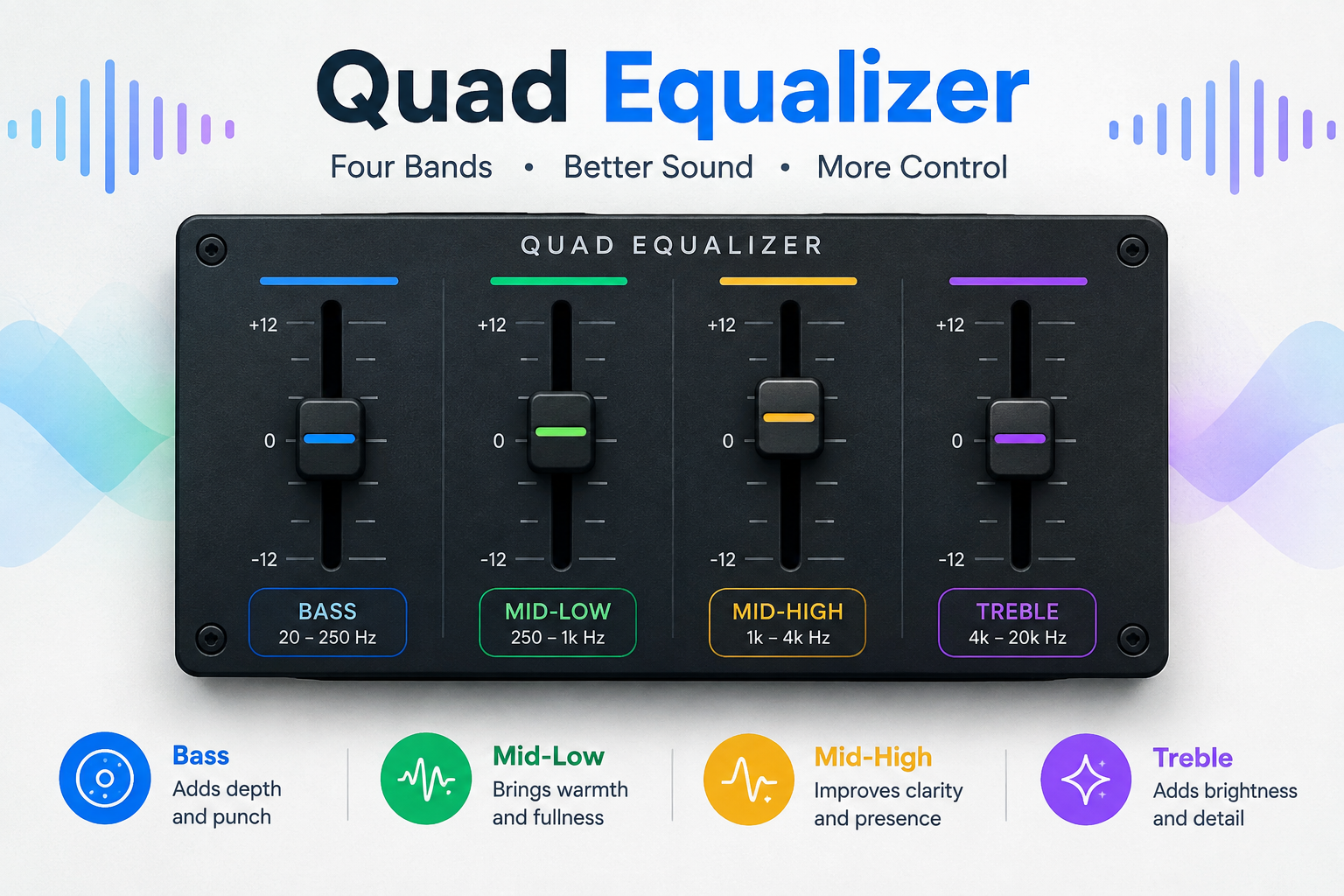
In a typical consumer or studio-audio context, a quad equalizer may refer to a four-band EQ. These bands commonly cover:
- Low frequencies
- Low-mid frequencies
- High-mid frequencies
- High frequencies
The purpose is to change the tonal balance of an audio signal. Users can boost frequencies they want to emphasize or cut frequencies that sound excessive.
However, the term is not completely standardized. Some professional products use “quad” to mean four independent audio channels, with each channel potentially containing multiple EQ filters.
Therefore, it is always better to check a product’s specifications instead of assuming that every quad equalizer has exactly four frequency controls.
How Does a Quad Equalizer Work?
An equalizer changes the relative level of selected frequencies within an audio signal.
The two basic actions are:
- Boost: increases the level around a selected frequency.
- Cut: decreases the level around a selected frequency.
These adjustments are normally measured in decibels (dB).
For example, if vocals sound muddy, reducing an appropriate low-mid area may make them clearer. If a recording sounds too dull, a modest increase in the high-frequency region may add brightness.
A parametric EQ can provide additional controls such as:
- Frequency: determines where the adjustment is centered.
- Gain: determines how much the frequency is boosted or reduced.
- Q or bandwidth: determines how wide or narrow the adjustment is.
A higher Q generally produces a narrower adjustment, while a lower Q affects a broader frequency range.
Understanding the Four Frequency Areas
A four-band audio EQ commonly divides control into four broad regions. Exact frequency boundaries vary between devices.
| EQ Area | What It Commonly Affects | Typical Problems |
|---|---|---|
| Low | Bass, weight, rumble | Boomy or weak sound |
| Low-Mid | Body, warmth, fullness | Muddy or boxy sound |
| High-Mid | Presence, clarity, attack | Harshness or lack of definition |
| High | Brightness, detail, air | Dullness or excessive sharpness |
Low Frequencies
The low end contributes much of the weight and impact of music.
Too much low-frequency energy can make a recording sound boomy or overpowering. Too little can make it feel thin.
Low-Mid Frequencies
The low-midrange contributes body and warmth to many voices and instruments.
Excessive energy here can make vocals, guitars, keyboards, or other sounds feel muddy or boxy.
High-Mid Frequencies
High mids are important for presence and intelligibility.
Adjusting this region carefully can help vocals and instruments become more defined. Excessive boosting, however, can make some recordings sound aggressive or harsh.
High Frequencies
The upper range contributes brightness and fine detail.
A small adjustment can sometimes make a dull recording feel more open, while too much high-frequency energy can emphasize hiss, harshness, or unpleasant brightness.
Quad Equalizer vs. Four-Band EQ
These terms are sometimes used interchangeably, but they do not always describe exactly the same thing.
A four-band EQ specifically means that four frequency bands are available for adjustment.
A quad equalizer, on the other hand, may describe a four-band design or a four-channel EQ system.
For example, professional equipment can have four independent audio channels, with each channel containing several EQ filters. In that situation, “quad” refers to the number of channels rather than the number of frequency bands.
This distinction is especially useful when researching older studio equipment or professional digital processors.
Graphic vs. Parametric Quad Equalizer
A quad equalizer can use different types of EQ architecture.
Graphic EQ
A graphic EQ normally provides fixed frequency bands. The user adjusts the level of each available band, often using sliders.
It is useful when you want straightforward and visual control over the overall frequency response.
Parametric EQ
A parametric EQ provides more detailed control.
Depending on the design, each band can allow you to adjust:
- Frequency
- Gain
- Q or bandwidth
This makes a parametric quad EQ more flexible when you need to target a particular frequency problem instead of broadly changing the sound.
The number of bands alone does not determine whether an EQ is graphic or parametric. A four-band EQ can be designed in different ways.
Common Uses of a Quad Equalizer
A quad equalizer can be useful in many audio situations.
Music Listening
Listeners can use EQ to adjust the tonal character of music according to their headphones, speakers, room, and personal preferences.
Voice and Podcast Audio
EQ can help improve speech clarity by controlling excessive low-end energy or unwanted midrange buildup.
Recording and Music Production
Producers and engineers use EQ as part of the mixing process to shape individual tracks and create an appropriate tonal balance.
Live Sound
EQ can help sound engineers manage tonal problems in microphones, instruments, speakers, and rooms.
Gaming and Headphones
Some users adjust EQ to change the balance between bass, dialogue, and high-frequency detail.
The goal should generally be controlled tonal adjustment rather than simply increasing every frequency.
How to Set a Quad Equalizer
There is no universal EQ setting that works for every recording. A good starting method is to make small adjustments and listen carefully.
Step 1: Start Flat
Set the available EQ bands close to 0 dB before making changes.
Step 2: Identify the Problem
Ask what you actually hear.
Is the sound:
- Too bass-heavy?
- Muddy?
- Thin?
- Harsh?
- Dull?
- Lacking vocal clarity?
Step 3: Adjust One Area
Change one frequency region at a time rather than moving every control simultaneously.
Step 4: Use Small Changes
Large boosts can quickly make audio unnatural or introduce unwanted coloration. A modest cut can sometimes solve a problem more effectively than a large boost somewhere else.
Step 5: Compare With Bypass
Temporarily bypass the EQ and compare the processed sound with the original.
Also try to keep the comparison at a similar listening volume because louder can easily be perceived as better.
Common EQ Mistakes to Avoid
Even a simple four-band EQ can be misused.
Excessive Boosting
Increasing several bands heavily can make the sound unnatural and may create unwanted peaks.
Changing Too Many Bands
If every control is moved at once, it becomes difficult to understand which adjustment actually helped.
Ignoring the Original Problem
EQ cannot solve every audio problem. A poor recording, damaged speaker, unsuitable microphone position, or problematic room may require a different solution.
Forgetting to Compare
Always check whether your EQ adjustment actually improves the sound compared with the original.
Quad Equalizer in Other Technical Contexts
The term quad equalizer is not limited to music.
In high-speed electronics, an equalizer can compensate for signal degradation in data-transmission paths. A “quad” equalizer in this context may contain four signal channels, rather than four audio frequency bands.
This is why context matters.
If you see terms such as:
- High-speed data
- Signal integrity
- Transmission lines
- DisplayPort
- Data channels
you may be looking at an electronic signal-conditioning component rather than an audio EQ.
How to Choose the Right Quad Equalizer
Before selecting a device or plugin, check its actual specifications.
Consider:
| Feature | Why It Matters |
|---|---|
| Number of bands | Shows how many frequency areas can be adjusted |
| Number of channels | Important for multi-channel systems |
| Frequency range | Determines which frequencies can be controlled |
| Gain range | Shows the available boost/cut amount |
| Q control | Determines adjustment width on parametric EQs |
| Filter type | Affects how each band shapes frequencies |
| Presets | Useful for repeatable configurations |
| Bypass | Allows easy comparison with the original signal |
Most importantly, determine whether “quad” refers to four bands, four channels, or another product-specific feature.
FAQs
1. What does quad equalizer mean?
Quad equalizer generally refers to an equalization system involving four bands, channels, or processing sections. In everyday audio discussions, it often means a four-band EQ.
2. Is a quad equalizer the same as a 4-band EQ?
Not necessarily. A four-band EQ has four frequency bands, while “quad equalizer” can also describe equipment with four independent audio channels.
3. What are the four bands of an equalizer?
A common four-band arrangement consists of low, low-mid, high-mid, and high frequencies. Exact frequency ranges depend on the specific EQ.
4. What is the difference between graphic and parametric EQ?
A graphic EQ generally uses fixed frequency bands, while a parametric EQ can provide adjustable frequency, gain, and bandwidth or Q controls.
5. Can a quad equalizer improve sound quality?
It can improve tonal balance when used appropriately. It can reduce excessive bass, control muddiness, improve presence, or adjust brightness. However, EQ cannot fix every recording, equipment, or acoustic problem.
6. Should I boost or cut frequencies?
It depends on the problem. Both approaches can be useful. Start with small changes and compare the result with the original signal.
7. Does “quad” always mean four EQ bands?
No. In some professional audio equipment, “quad” refers to four independent channels. Product specifications should be checked to determine exactly what the term means.
Conclusion
A quad equalizer provides a practical way to control the tonal balance of an audio system, but the term can describe different designs. In common audio use, it may refer to a four-band EQ covering low, low-mid, high-mid, and high frequencies. In professional equipment, however, “quad” may indicate four separate channels with multiple EQ controls.
The most important point is to look beyond the name. Check the number of bands, channels, frequency ranges, filter types, gain controls, and Q settings before choosing or configuring a quad equalizer. With careful, moderate adjustments, an EQ can help create clearer, more balanced audio without unnecessarily changing the character of the original recording.
Learn About: Applied Computer Technologies
