

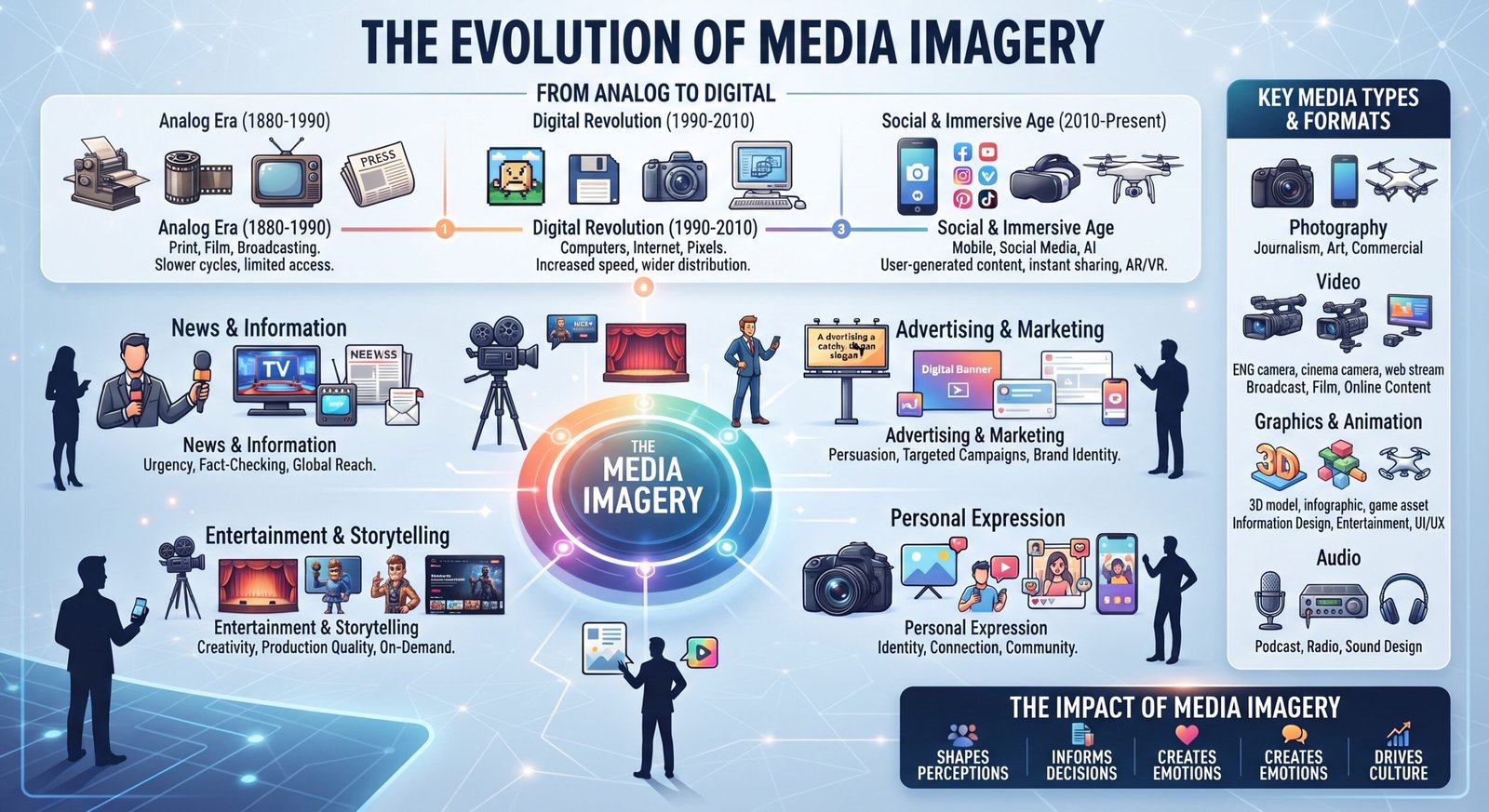
In a world where people scroll through websites, social media feeds, news platforms, and digital publications every day, visual communication has become increasingly important. Words explain ideas, but strong visuals can help audiences understand those ideas faster.
This is where media imagery plays an important role.
From photographs accompanying news reports to illustrations used in online articles, imagery helps provide context, establish emotion, and make information easier to absorb. Businesses use visual content to strengthen their branding, publishers use it to improve readability, and news organizations use photographs and graphics to help audiences understand events.
However, effective imagery is about more than simply adding a picture to a page. The visual should be relevant, useful, appropriately sourced, and connected to the surrounding content.
This guide explains what media imagery means, the different types available, why it matters, and how publishers and content creators can use it effectively.
What Is Media Imagery?
Media imagery is visual content created, selected, or published to communicate information, support a story, influence perception, or improve audience engagement.
It can appear across many forms of media, including:
- News websites
- Blogs and online magazines
- Social media platforms
- Television and video
- Advertising
- Corporate websites
- Digital publications
- Educational resources
- Marketing campaigns
Media imagery can be factual, descriptive, artistic, promotional, or illustrative depending on its purpose.
For example, a news article about a major event may use a photograph taken at the location. A technology article might use a product image or explanatory diagram. Meanwhile, an entertainment website may use promotional photographs or graphics to complement a story.
The most effective imagery does not exist independently of the content. It adds meaning or context.
Types of Media Imagery
Media imagery covers a broad range of visual formats. Understanding these formats can help publishers select the right visual for each situation.
1. Photographs
Photography is one of the most recognizable forms of media imagery.
Photographs can document real events, introduce people, showcase products, or create an emotional connection with readers.
Examples include:
- News photography
- Portrait photography
- Product photography
- Event photography
- Travel photography
- Editorial photography
Authentic photography can be especially valuable when readers need visual evidence or context.
2. Illustrations
Illustrations provide an alternative when photography is unavailable or unsuitable.
They can simplify complicated concepts, represent abstract ideas, or give an article a distinctive visual identity.
For example, an article explaining a complex scientific concept could use an illustration to show how a process works.
3. Infographics
Infographics combine text, numbers, charts, icons, and design elements to communicate information visually.
They are particularly useful for:
- Statistics
- Comparisons
- Timelines
- Processes
- Research findings
- Step-by-step explanations
A well-designed infographic can make large amounts of information easier to understand.
4. Videos and Motion Graphics
Modern media imagery is not limited to static pictures.
Video, animation, GIFs, and motion graphics can demonstrate processes and provide a more immersive experience.
For instance, a tutorial can use video to demonstrate a procedure that would be difficult to explain using text alone.
5. Screenshots and Visual Demonstrations
Screenshots are particularly useful for technology, software, and instructional content.
They allow readers to see exactly what a website, application, dashboard, or process looks like.
When used appropriately, screenshots can reduce confusion and make tutorials easier to follow.
Why Media Imagery Matters
Visual content can influence how people interact with information.
A page containing relevant and meaningful imagery is often easier to scan than a large block of uninterrupted text. Visuals can also establish context before someone reads the entire article.
Improving Understanding
Some concepts are easier to understand visually than verbally.
For example, explaining the structure of a machine entirely through text may be difficult. A labeled diagram can communicate the same information much more efficiently.
Increasing Engagement
Relevant images can make an article more visually appealing and encourage users to continue reading.
However, adding images simply to increase the number of visuals is not necessarily helpful. Each image should have a purpose.
Creating Emotional Context
A photograph can communicate emotion quickly.
In journalism and storytelling, facial expressions, environments, objects, and carefully composed scenes can influence how an audience understands a story.
Supporting Brand Identity
Businesses can use consistent photography, illustrations, typography, and graphic styles to create recognizable visual identities.
Consistency can make content appear more professional and trustworthy.
Media Imagery in Digital Publishing
Online publishers need to think carefully about how imagery works within an article.
A useful image should complement the surrounding information rather than distract from it.
For example, an entertainment article might benefit from an appropriate visual introduction to a story. If the article discusses unusual or amusing news, relevant examples can help readers understand the type of content being discussed. A publisher covering humorous stories, for instance, might naturally reference a collection such as [funny news stories] as additional reading.
How to Choose Effective Media Imagery
Choosing an image should involve more than asking whether it looks attractive.
Consider these factors:
| Factor | What to Consider |
|---|---|
| Relevance | Does the visual directly support the content? |
| Quality | Is it clear, properly sized, and professionally presented? |
| Context | Does the image accurately represent the subject? |
| Originality | Is it distinctive rather than generic? |
| Licensing | Do you have permission to use it? |
| Accessibility | Can users with visual impairments understand its purpose? |
| Performance | Is the file optimized for fast loading? |
Match the Image to the Message
An image should help readers understand what the content is about.
Avoid using unrelated stock photographs simply because they look appealing. A generic photograph of someone typing on a laptop, for example, may add little value to an article about a specific software feature.
Prioritize Quality
Poor-quality, stretched, pixelated, or incorrectly cropped images can make otherwise excellent content look unprofessional.
Use an appropriate resolution and crop images according to their placement.
Consider Accessibility
Accessibility should be part of responsible digital publishing.
Where appropriate, provide useful alternative text so assistive technologies can communicate the purpose of an image to users who cannot see it.
Do not stuff keywords into alt text. Describe the image naturally and accurately.
Copyright and Image Licensing
One of the most important considerations when using media imagery is copyright.
An image appearing in Google Images, social media, or another website is not automatically free to use.
Before publishing an image, determine whether you have the necessary rights.
Potential sources include:
- Your own original photography
- Commissioned artwork
- Properly licensed stock imagery
- Public-domain materials
- Images distributed under appropriate Creative Commons terms
Always check the specific license and follow its requirements, including attribution when required.
When an image depicts identifiable people, locations, artwork, or private situations, additional legal and ethical considerations may also apply.
Media Imagery and SEO
Images can contribute to a better search experience when they genuinely improve the page.
SEO-friendly image practices include:
- Use relevant images.
- Give image files descriptive names where practical.
- Write concise, meaningful alt text.
- Compress images without unnecessarily damaging quality.
- Use suitable image dimensions.
- Ensure images work well on mobile devices.
- Place visuals near relevant content.
- Avoid misleading imagery.
Image optimization should support users first.
Likewise, readers looking for television-related information may find a [Great Britain TV Guide] useful when an article discusses British television, programming, or entertainment media.
The important point is relevance. Internal or external references should make sense in the context of the page rather than being inserted solely for SEO purposes.
The strongest approach is to create useful content and use imagery where it genuinely helps readers.
Common Media Imagery Mistakes to Avoid
Even attractive visuals can hurt the user experience when used incorrectly.
Using Irrelevant Images
A visually impressive image is not automatically useful. The connection between the visual and the written content should be clear.
Overloading the Page
Too many images can make a page cluttered, slow, or difficult to navigate.
Use visuals strategically.
Ignoring Copyright
Copying images from other websites without permission can create legal and reputational problems.
Using Low-Quality Stock Photography
Overused stock images can make content feel generic. Where possible, choose authentic, relevant, or original visuals.
Forgetting Mobile Users
An image that looks good on a desktop may be poorly cropped or excessively large on a smartphone.
Always consider responsive presentation and page performance.
Practical Examples of Media Imagery
Consider an article about British television.
A useful visual strategy could include:
- A relevant television-related photograph
- A simple programming graphic
- A screenshot where appropriate and legally permitted
- Supporting illustrations
- Descriptive captions
For an article about unusual news stories, editorial photographs or appropriately created illustrations can help establish context without misleading the reader.
The same principle applies across industries. A cooking website may use step-by-step photographs, while a financial publication may rely more heavily on charts and data visualizations.
The best media imagery depends on the audience, topic, and purpose of the content.
Key Takeaways
- Media imagery includes photographs, illustrations, graphics, infographics, screenshots, videos, and other visual content.
- Effective visuals should add information, context, emotion, or clarity.
- Relevance is more important than simply adding attractive images.
- Publishers should respect copyright and image licensing requirements.
- Descriptive alt text can improve accessibility.
- Image compression and responsive sizing can improve website performance.
- SEO should never come at the expense of user experience.
- Original and genuinely useful visuals can help content stand out.
FAQs
What is the meaning of media imagery?
Media imagery refers to visual material used to communicate, explain, document, or support information in media and digital content. It includes photographs, illustrations, graphics, infographics, videos, and screenshots.
Why is media imagery important?
Media imagery helps people understand information, attracts attention, establishes context, communicates emotion, and improves the overall reading or viewing experience.
What are examples of media imagery?
Common examples include news photographs, editorial illustrations, infographics, charts, screenshots, product images, videos, animations, and social media graphics.
Is media imagery important for SEO?
Yes, when it improves the user’s experience. Relevant images, descriptive alt text, appropriate image dimensions, and optimized file sizes can support accessibility, usability, and image discovery.
Can I use any image I find online?
No. Most images are protected by copyright unless they are licensed for your intended use, fall under an applicable exception, or are otherwise legally available for reuse. Always verify usage rights before publishing.
What makes good media imagery?
Good media imagery is relevant, clear, accurate, appropriately licensed, accessible, and useful to the audience. It should strengthen the content rather than simply fill empty space.
Conclusion
Media imagery is a fundamental part of modern communication. Whether it is a photograph documenting an event, an infographic explaining statistics, or an illustration simplifying a difficult concept, visual content can make information clearer and more engaging.
The key is purposeful use. Instead of adding images for decoration or manipulating visuals purely for search rankings, publishers should select imagery that genuinely helps their audience.
When relevance, quality, accessibility, copyright, performance, and context are considered together, media imagery becomes more than decoration—it becomes an effective communication tool that strengthens the entire content experience.
